What Happens After You Click Send? The Internals of an LLM Request

Table of Contents
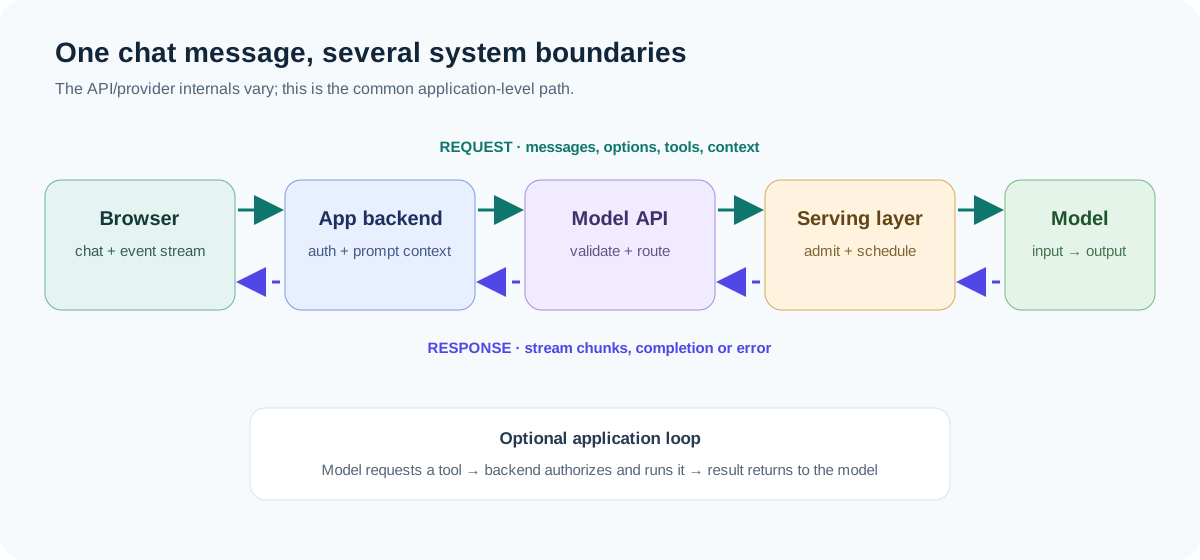
You type a question, press Send, and an answer starts appearing a moment later. From the outside, that looks like one operation. Inside the application, it is a chain of smaller steps: a request is assembled, routed, admitted by a serving system, converted into model input, generated piece by piece, and streamed back to your screen.
This post follows one ordinary chat message through that chain. We’ll focus on the software and infrastructure around the model rather than the math used to train it. Provider implementations differ, but the same broad stages show up in hosted APIs and local inference servers.
The example request #
Suppose you ask:
Why did the latest deployment fail, and what should I check first?
The browser does not usually send only that sentence. It may send conversation history, a system instruction, model options, tool definitions, and identifiers used for tracing. The server may add retrieved documents or other application context before contacting the model.
That distinction is useful: the text you see in the chat window is not necessarily the complete input the model receives.
1. The application turns a chat into a request #
When you press Send, the UI first records the user message and moves the conversation into a pending state. It then calls your application backend. A typical application request might conceptually contain:
{
  "conversationId": "conv-42",
  "message": "Why did the latest deployment fail, and what should I check first?",
  "stream": true
}
The browser should generally call your own backend, not expose a provider secret in client-side code. The backend authenticates the user, checks request limits, loads any conversation state it owns, and decides which model or workflow should handle the message.
At this point, the app can also enforce ordinary product rules: maximum message size, access to a particular workspace, whether the user can invoke tools, and how much conversation history to retain. These are application responsibilities, independent of model internals.
2. The backend builds the model input #
The backend gathers the pieces that form the model request. A simplified chat might look like this:
System: You are a helpful operations assistant. Use the supplied logs as evidence.
User: Why did the latest deployment fail, and what should I check first?
Assistant: [previous reply, if included]
User: [current message]
In an application with retrieval, the backend may search a document store and insert relevant runbooks or log excerpts. With tools enabled, it can also include tool names, descriptions, and argument schemas. These additions affect what the model can see and what actions it may request.
The request is commonly represented as structured messages with roles such as system, user, and assistant. The provider or model runtime then applies the model’s expected chat format. That format can contain special boundary markers that are not visible in the chat UI. For local models, the tokenizer and chat template are often part of the model/runtime configuration; Hugging Face documents how chat messages are converted with a model-specific template and tokenizer (chat templating).
This is why copying the visible prompt into a plain text file may not reproduce the exact model input. The hidden structure, prior turns, inserted context, and tool definitions can all matter.
3. The request crosses an API boundary #
The backend sends an HTTPS request to a hosted model API, or to a local serving endpoint such as one exposed by an inference runtime. The request usually identifies a model and may include generation options, such as a maximum output length or sampling settings. The exact field names and behavior depend on the API.
The serving edge typically handles concerns such as authentication, request validation, routing, and usage accounting. In a hosted service, the application usually cannot see the provider’s complete internal architecture. A local deployment gives you more visibility into the serving process, but then your own infrastructure must handle capacity, health, and access control.
What does “model selection” mean here? #
An API model name may be a direct model identifier, a versioned deployment, or an alias selected by the provider. Behind that name, a service may route traffic among compatible workers. The routing policy is implementation-specific; treat the public model identifier as the contract your application can rely on, not as a promise about a particular machine or hardware layout.
4. Admission, queues, and capacity #
The request reaches a serving system that has to decide when and where it can run. If capacity is available, it may be dispatched quickly. If many requests arrive together, the service may queue, throttle, or reject some of them. Rate limits and concurrency limits are part of this operational boundary.
For a local model server, the same pressure is visible in GPU or accelerator memory, CPU usage, batch size, and the number of simultaneous sessions. A server may batch work from multiple users to improve hardware utilization. Batching can improve throughput, while a busy queue can increase an individual request’s wait time.
This creates two different measures:
- Latency: how long one request takes from the user’s perspective.
- Throughput: how much work the service completes over time.
A system can have high throughput and still feel slow when users are waiting in a queue. That is one reason to measure queue time separately from model generation time when your serving stack exposes both.
5. Text becomes tokens, then generation begins #
Before the model can process text, the input must be represented in the format it expects. Tokenization maps text into token IDs. A token might be a whole word, part of a word, punctuation, or a special marker; token boundaries do not reliably match words.
The runtime also needs to fit the request within the model’s context limit. The usable context includes more than the newest user message: system instructions, earlier turns, retrieved passages, tool definitions, and generated output all consume room. Applications often manage this by trimming older turns, summarizing conversation history, or limiting retrieved content.
Once the input is prepared, generation has two broad phases:
- Prompt processing: the runtime reads the supplied input and prepares internal state for this request.
- Token generation: the runtime produces the response incrementally, choosing each next token based on the input and tokens already produced.
You do not need the details of neural network computation to reason about these stages. For application performance, a helpful distinction is that a long input can take time to process before the first response token is ready, while a long answer takes additional time as output is generated.
6. Why the answer streams in pieces #
Many chat experiences display output as soon as it is available. Instead of waiting for one complete response body, the server sends a sequence of events or chunks. A common web transport is Server-Sent Events (SSE), though APIs and local runtimes may use other streaming formats.
The path looks like this:
- The model runtime produces a token or small piece of text.
- The provider or local server packages it into a stream event.
- Your backend forwards the event to the browser, possibly adding application metadata.
- The UI appends the text to the assistant’s message.
- A final event indicates completion, an error, or another control outcome.
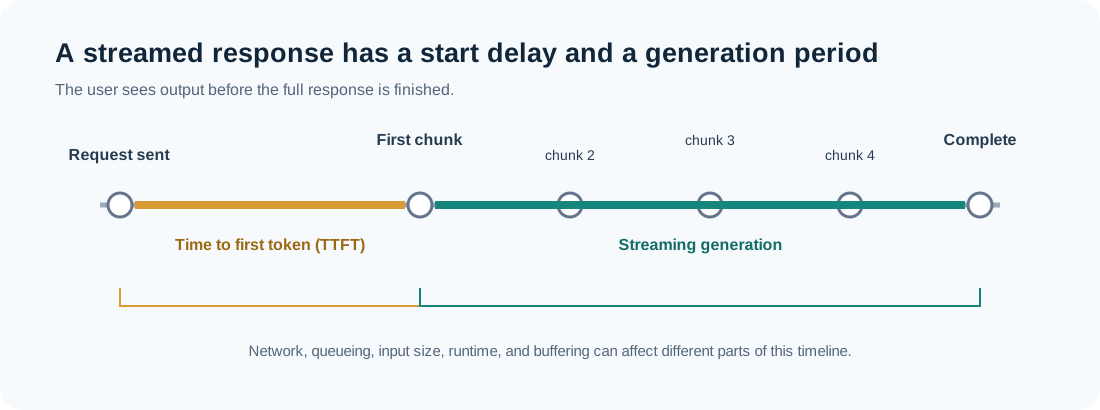
The first visible text is not the same as the total response time. Time to first token (TTFT) measures how long it takes before output begins. Generation time covers the period in which the remaining output arrives. Network buffering, proxy configuration, application code, and browser rendering can all affect when a chunk becomes visible.
Streaming improves perceived responsiveness, but it changes how your app handles failures. The connection can end after some text has already appeared. Your UI should represent incomplete output clearly, and your backend should distinguish a stream that completed normally from one that was interrupted.
7. The model may answer with a tool request #
If the request includes tools, the model can return a structured request to call one. For example, it might ask the application to run get_deployment_events with a deployment ID. The model does not normally execute your infrastructure command by itself: the application receives the request, validates it, checks authorization, runs the tool, and sends the result back in a follow-up model request.
User question
    ↓
Model requests a tool call
    ↓
Application validates and executes the tool
    ↓
Tool result is added to the conversation
    ↓
Model produces a user-facing answer
This loop may happen more than once. It also means a single button press can produce multiple model requests and tool calls. Logging only the final response hides much of the work—and makes it harder to diagnose why an answer is wrong or slow.
8. The response returns to the application #
As stream events arrive, the backend can forward them to the client. When the stream ends, it should capture the outcome and persist whatever conversation state the product needs. Depending on the API, the final response may include usage information, a finish reason, or a request identifier. Those fields vary by provider, so store them as provider metadata rather than assuming one universal response schema.
The browser then marks the message complete, enables the next input, and may render formatting such as Markdown. If the user navigates away or cancels the request, the app can attempt to cancel upstream work too. Whether that cancellation stops generation immediately depends on the client, backend, and model service.
9. Where the time goes #
From the user’s perspective, request time is the sum of several waits and work stages:
| Stage | What can add time? | What to measure |
|---|---|---|
| Browser to backend | Network, upload, frontend work | Client request start and response start |
| Backend preparation | Database reads, retrieval, prompt assembly | Application spans by operation |
| Serving admission | Queueing, rate limits, capacity | Queue or admission time, if exposed |
| Input processing | Large history, long retrieved context | Input size and time to first token |
| Output generation | Long answer, runtime speed | Output tokens and generation duration |
| Stream delivery | Proxies, buffering, network | First chunk and inter-chunk timing |
The stages are not always observable as separate numbers. Hosted APIs may expose only a subset, while a self-hosted stack can expose more infrastructure metrics. Still, recording timestamps at your own boundaries helps isolate whether delay is in your application, the upstream call, or delivery to the browser.
For each request, useful application telemetry often includes a correlation ID, model/deployment name, request start and end time, time to first chunk, input/output size or token counts when available, retry count, and final outcome. Avoid logging credentials or sensitive prompt content by default; decide what to retain based on your product’s privacy and debugging needs.
10. Why the same question can get different answers #
The request path explains some variation. The application may have supplied different conversation history, retrieved documents, tool results, or model versions. Even if the visible user message is identical, the actual structured input may differ.
Generation settings can also affect outputs, and some systems make nondeterministic choices during generation. Changes to a model deployment or provider-side routing may also alter behavior over time. For debugging, capture enough request metadata to reconstruct the conditions of a call, while respecting user privacy and data-retention rules.
A compact mental model #
When you press Send, think of the work as four boundaries:
- Application boundary: authenticate, authorize, assemble context, and choose a workflow.
- Serving boundary: accept, route, queue, and prepare the request.
- Generation boundary: process input and produce output incrementally, possibly requesting tools.
- Delivery boundary: stream events back, record the outcome, and update the UI.
That model is enough to make many practical decisions: where to add tracing, why an answer has a slow start, why a prompt may exceed context, and why tool-enabled chat needs application-side authorization. The model is only one component in a larger request lifecycle.
Further reading #
- Hugging Face: Chat templating — how structured chat messages are rendered for a model.
- MDN: Server-Sent Events — a browser-oriented explanation of the streaming transport.